String Operations In Shell Scripting
B
I am DevOps Engineer who works on DevOps tools like Docker, Kubernetes, Terraform, Git, GitHub, Jenkins and AWS services.
Operations On String In Shell Script
-> On the string we can perform multiple operations which we are going to see -
-> Suppose we want to find the Length of the String then -
#!/bin/bash
myVar="String Operations"

stringLength=${#myVar} # It will find the Length of the string

echo "Length of the string is - $stringLength"
Output -

To Convert all Letters in Upper Case -
#!/bin/bash
myVar="String Operations"

upperCaseVariable=${myVar^^} # It will convert all the letters into upper case

echo "Upper Case is - $upperCaseVariable"
Output -

To convert all Letters in Lower Case -
#!/bin/bash
myVar="String Operations"

lowerCaseVariable=${myVar,,} # It will convert all the letters into lower case

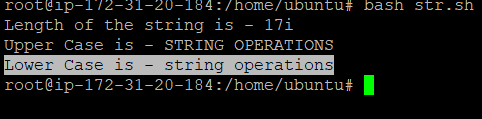
echo "Lower Case is - $lowerCaseVariable"
Output -
To replace a word with another word -
#!/bin/bash
myVar="String Operations"

replaceWord=${myVar/String/ReplacedString} # First of all we have to give name of the variable and then string that we want to replace and then the values by whic we want to replace

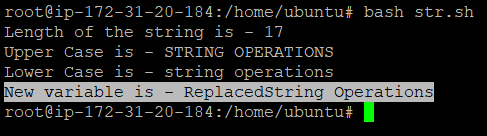
echo "New variable is - $replaceWord"
Output -
Slicing of the String -
-> Suppose we want to get some part of the sentence then with the help of a string slice we can achieve this -
#!/bin/bash
myVar="String Operations"

stringSlice=${myVar:3:7} # To  get the word from 3 character number to 7 characters i.e. start from 3 character and take 7 characters

echo "In a myVar Variable from 3rd charcter and total should be 7 characters is - $stringSlice "
Output -

