Variables And Array In Shell Scripting
I am DevOps Engineer who works on DevOps tools like Docker, Kubernetes, Terraform, Git, GitHub, Jenkins and AWS services.
What is a Variable in Shell Scripting?
-> Variable is like a container or a box where we store the data or value.
Example -
<variable name>=value
name="bhaskar"
-> And to use this variable value in the script, we have to use $ and then variable name($variable_name) as -
echo "My name is $name"
#!/bin/bash
# This script will show how to use variable
 name="bhaskar"  # Here we have defined the variable
 echo "My name is $name" # Here we are using the variable
Output -

-> If we want to change the variable values then we can change them as -
#!/bin/bash
 name="bhaskar"
 echo "My name is $name"

 name="Bhaskar Mehta"
 echo "My name is $name"
Output -
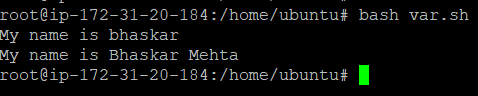
-> Till now we were storing the constant values in the variable, now if we want to store the variable value in the variable then we can store it as -
#!/bin/bash
 hostname=$(hostname) # Here we are not using constant value in the variable
 echo "Hostname is - $hostname"
Output -

Constant Variable
-> Earlier we have seen that we can change the values of the variable.
Ex -
#!/bin/bash
name="Bhaskar"
echo "My name is $name"
name="Bhaskar Mehta"          # Here value of "name" variable is changed from Bhaskar to Bhaskar Mehta
echo "My name is $name"
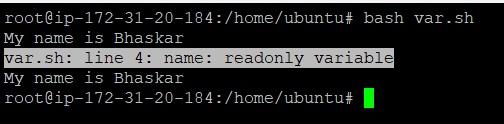
-> Now if we don't want to change the variable values then we have use readonly keyword before the variable name as -
#!/bin/bash
readonly name="Bhaskar"
echo "My name is $name"
-> Now if we change the value of name variable then we will not be able to do that -
#!/bin/bash
readonly name="Bhaskar"
echo "My name is $name"
name="Bhaskar Mehta"
echo "My name is $name"
Output -
Arrays
-> Till now we were storing the single value into a variable. Suppose we have to store multiple values then we will have to create separate variables for each value but creating multiple variables is not a good solution in all scenarios to store the values.
-> Using Array we can store multiple values of single or multiple types in an array and we will not have to create a separate variable for each value. So now we will use the concept of Arrays to store the values.
To define an Array-
-> We have to use the space-separated values in the variable as -
myArray=(1 2 3 4 "Bhaskar" 3.5)
To retrieve an array value -
echo ${myArray[0]}
#!/bin/bash
#Arrays
myArray=(1 2 3 4 "Bhaskar" 3.5)
echo ${myArray[0]} # It will fetch the index 0 values of myArray
Output -

-> If we want to get all the values of arrays then -
#!/bin/bash
#Arrays
myArray=(1 2 3 4 "Bhaskar" 3.5)
echo "All the values in the Arrays are - ${myArray[*]}" # It will fetch all values of myArray
Output -

To access the numbers of array values from a particular index -
#!/bin/bash
#Arrays
myArray=(1 2 3 4 "Bhaskar" 3.5)
echo "3 values from array that start from index 2  in the Arrays are - ${myArray[*]:2:3}" # It will fetch the 3 values from index no.2
Output -

To find the length of the array -
#!/bin/bash
#Arrays
myArray=(1 2 3 4 "Bhaskar" 3.5)
echo "3 values from array that start from index 2  in the Arrays are - ${myArray[*]:2:3}" # It will fetch the 3 values from index no.2


arrayLength=${#myArray[*]}  # It will calculate the length of the array
echo "Length of array is - $arrayLength"
Output -

To update an Array -
If we want to add more values to the existing array then
#!/bin/bash
#Arrays
myArray=(1 2 3 4 "Bhaskar" 3.5)
echo "3 values from array that start from index 2  in the Arrays are - ${myArray[*]:2:3}" # It will fetch the 3 values from index no.2


arrayLength=${#myArray[*]}  # It will calculate the length of the array
echo "Length of array is - $arrayLength"

myArray+=("Updated Array" 5 10 20) # Adding the new values to existing array

echo "Updated array is ${myArray[*]}"
Output -

Key-Value Pair in Array
-> We will see the array that is stored in the key value form -
To declare the Array -
declare -A <arrayname>
Example -
declare -A myArray
myArray=([name]="bhaskar" [age]=23)
To retrieve the value -
echo ${myArray[name]}
#!/bin/bash
declare -A myArray # To use the key value array we have to declare like this

myArray=([name]=Bhaskar [age]=23) #Using the key value concept in the array

echo "Name is - ${myArray[name]}" # Accessing the values using the key name
Output -

